GoldenRoo App Download Information for Australians
GoldenRoo offers Aussies a simple means to connect through their mobile phone. As opposed to installing the application from an app store, users can utilise a Progressive Web Application (PWA). The following text outlines how to install the GoldenRoo progressive app on Android and iOS devices, so that mobile users can utilise this service and its benefits.
Installation Guide
Installation of the GoldenRoo PWA is fairly easy and takes less than 2 minutes. However, the process itself depends on whether you use an Android or an Apple device.
 Install
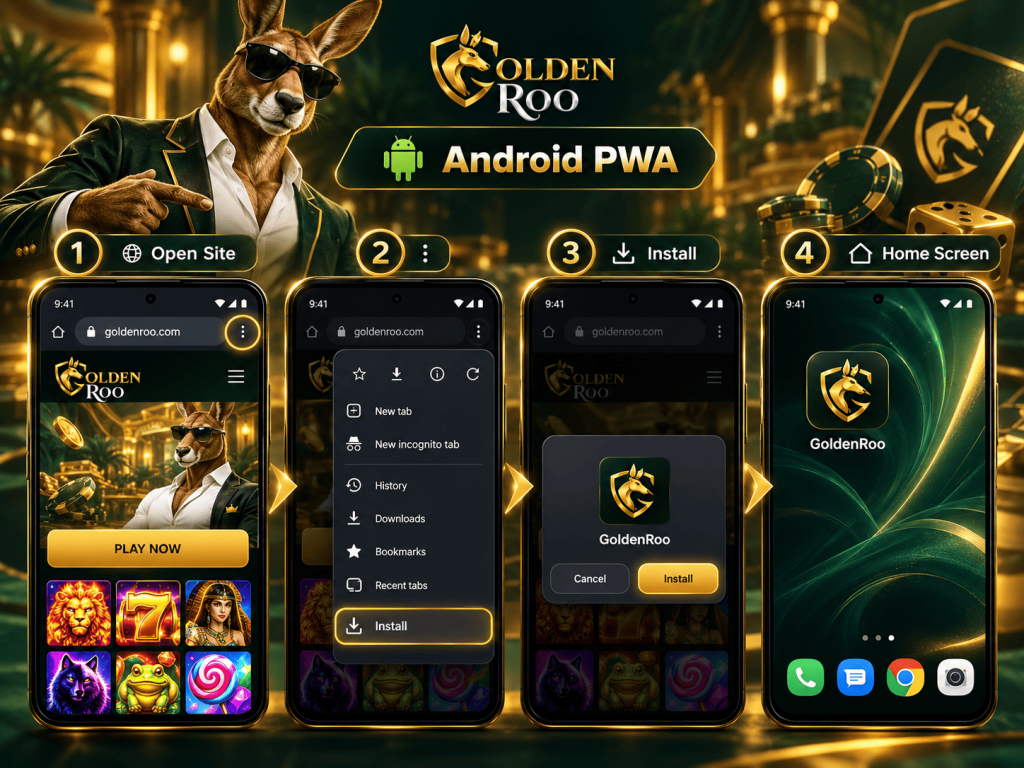
Installation of the PWA on an Android Device
Normally, Android devices provide the user with a relatively simple way of adding websites that are compatible with the tech to the home screen. The exact names of the menus that need to be used may slightly vary based on the manufacturer and version of your browser and smartphone.
- Firstly, you need to open one of the supported browsers and visit the GoldenRoo website.
- You also need to make sure you have a good internet connection prior to installation.
- Then, open the browser menu. You usually do it by tapping the three dots at the upper or lower part of the screen.
- Finally, look for an option to “install” the website. Usually, there is a menu item called Install app or something close to that.
- From that point, just follow the on-screen instructions to install the application.
- After completing the installation procedure, GoldenRoo PWA will appear among other icons on the home screen of your smartphone.
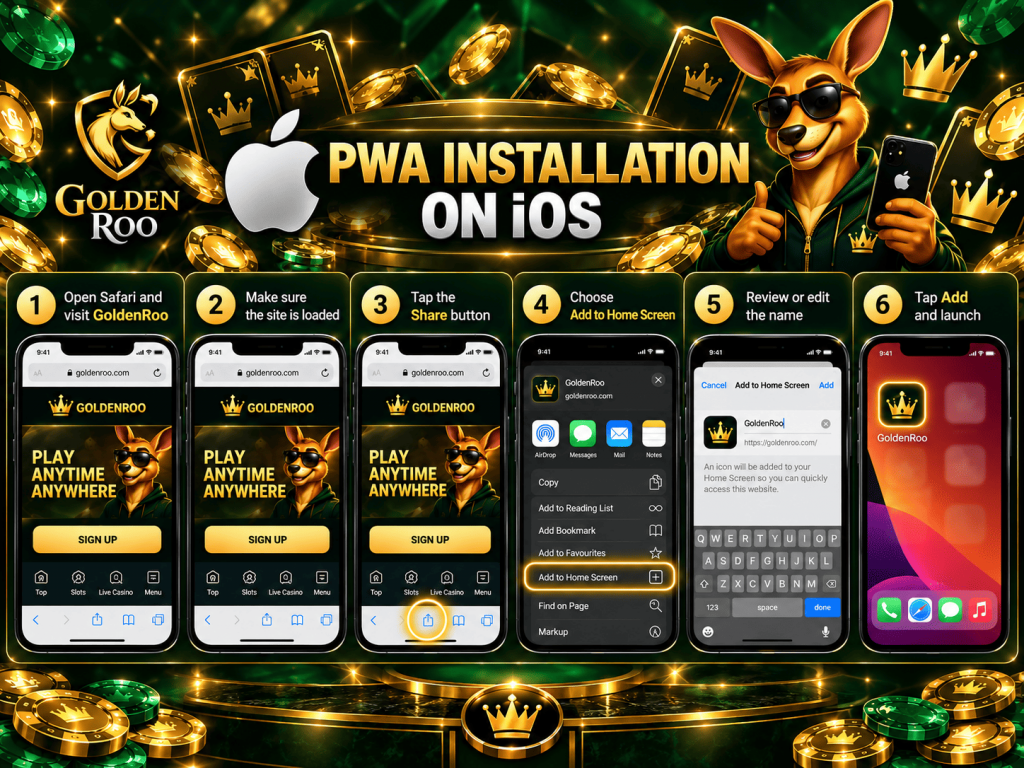
PWA Installation on iOS
In the case of iPhone and iPad, it is a little different due to the Safari browser, which uses a standardised technique for adding a web application to the home screen.
- Navigate to the GoldenRoo website using the Safari browser on your iPhone/iPad.
- Make sure the site is fully loaded, and the internet is reliable.
- Click on the Share button, which is a square with a pointed arrow upward.
- Choose “Add to Home Screen.” You might have to scroll down to see this option.
- Check the name of the shortcut. In most cases, you can keep the suggested name or change it.
- Tap “Add.” The Safari browser creates the shortcut on the home screen.
You can now open the GoldenRoo PWA using the shortcut on the home screen, just as with other shortcuts/applications.
Hardware Requirements
The Golden Roo PWA will not demand high-end hardware or any gaming device to run on. It will only need 2 GB of RAM, space to store temporary files and cache data, and a good internet connection.
Mobile use needs 4G, 5G, or even Wi-Fi to have good connectivity while using the application. There is no need for a dedicated graphics card or processor since the user is only required to access the application via the web browser. These are practical, common-sense requirements and not GoldenRoo-published, official ones.
Compatible Devices for Golden Roo Australia
The Progressive Web App is available to use via multiple device categories, namely:
- Android smartphones and tablets;
- iPhones and iPads;
- Windows PCs and Mac computers.
Experience may vary depending on the screen size and device capability. Old devices may struggle with modern web content, so if there are any issues, it is important to see if the device is up to date with the latest OS and browser updates.
Are PWA and App the Same Thing?
A PWA is not considered to be the same type of mobile application that is designed traditionally, despite the fact that their interface can have many similarities.
The regular app is tailored especially for the OS and is usually installed via the official application store of a platform. However, a PWA utilises web technology and is opened in the browser, but it can still offer app-related features like a home screen icon or a separate way of accessing the service.
It should also be noted that the update process for both types of services can differ, because the user of the traditional app has to install the update from an app store, while the web-based app gets it directly from the website.
Troubleshooting
Sometimes the GoldenRoo PWA installation and operation can pose problems for you. There are several ways in which such troubles can be fixed:
- Missing option for installation: Ensure that you have an up-to-date version of your browser. When installing on iOS devices, make sure to use Safari for website addition.
- Icon not visible: Search the home screen pages and the application library and re-add the shortcut if required.
- Website fails to load: Ensure you have an active Wi-Fi or mobile Internet connection. You can even exit and re-enter the browser.
- PWA is performing slowly: Exit all unnecessary browser tabs and applications. Rebooting the device can also help in such cases.
- No login is possible: Ensure that you have correctly entered all login details and the website is loading properly. If the problem persists, contact the customer support of the platform.
- PWA stops working after updating software: See if there is any browser or operating system update available. Both should be up-to-date to prevent issues.
If nothing resolves your issue, then contacting GoldenRoo’s support would be the next best step to take.
Benefits of Utilising the GoldenRoo PWA
Some practical benefits for mobile users could be associated with using GoldenRoo as a PWA:
- Fast access can become an obvious benefit of the PWA. Since the user places the icon of GoldenRoo on his/her home screen, he/she does not have to type in the website URL every time.
- Not requiring a conventional app download could also make the process easier. One can use the service in the browser and set up a shortcut on the home screen without a traditional installation from the app store.
- Home-screen access convenience will make it similar to a conventional mobile app. One could add the Golden Roo icon to the home screen among other icons and shortcuts.
- Less need for storage space could also be a benefit. Since the PWA works with web-based content to a large extent, one may not need to free the required amount of device storage for a conventional large-sized app.
- Auto updates also minimise manual update management by users.
- Lastly, a PWA is convenient for individuals using multiple devices that are compatible with the service. This means that there will be no need to rely on any particular installation of the native application.
FAQ
Can I access my GoldenRoo account using more than one device?
Yes. You should be able to access your GoldenRoo account from compatible devices using your existing login credentials, subject to the casino’s account terms.
Would my GoldenRoo account balance remain the same on the PWA?
Yes. The PWA gives you access to your existing GoldenRoo account and does not create a separate account or balance.
Is it possible to play at GoldenRoo Australia while travelling?
Access may depend on your geographical location at the time and the applicable local laws and restrictions.
Can I get support from Golden Roo via the PWA?
Yes. The PWA provides access to the same 24/7 Live Chat support available through the GoldenRoo website.